
SMS Messaging Policy – Account Verification & MFA
1. Purpose
Medical Billing Services (“MBS,” “MBSRCM,” “we,” “us,” or “our”) uses SMS messaging for account security and multi-factor authentication (MFA).
SMS messages sent through this program contain one-time verification codes used to verify a user’s mobile number during MFA enrollment and to authenticate an existing user’s login.
This SMS program is not used for marketing or promotional messages.
2. Who Receives SMS Messages
SMS messages are sent only to existing customers and authorized users of MBS applications who choose SMS as an available MFA verification method.
The user enters the mobile number they want to use for SMS verification within the authenticated application.
3. How SMS MFA Enrollment Works
MFA enrollment takes place within the authenticated ADSelfService Plus application to access EHR Application.
The enrollment process works as follows:
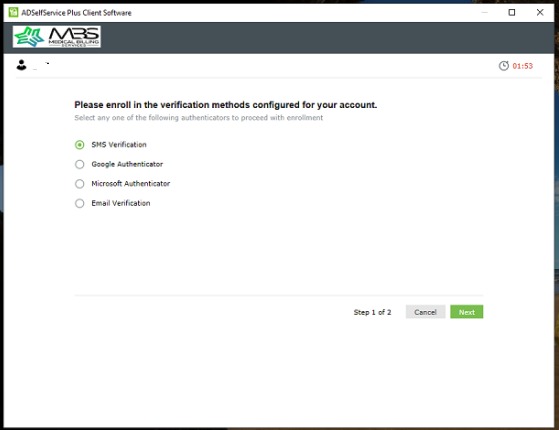
Step 1 – Select SMS Verification
The user is presented with the available verification methods configured for their account, which may include:
- SMS Verification
- Google Authenticator
- Microsoft Authenticator
- Email Verification
The user may select SMS Verification when they want to use SMS as their MFA method.
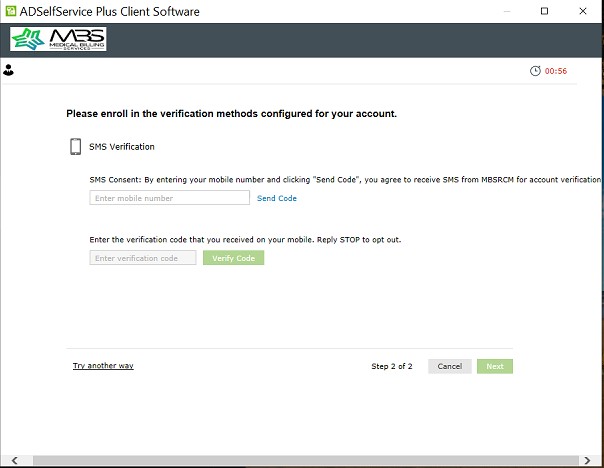
Step 2 – Enter Mobile Number
The user enters the mobile number where they want to receive the verification code.
The application displays the following SMS consent notice:
The user then selects Send Code.
Step 3 – Receive and Enter the Verification Code
A one-time verification code is sent by SMS to the mobile number provided by the user.
The user enters the verification code into the application and selects Verify Code.
The mobile number is then verified and SMS MFA enrollment is completed.
4. SMS Consent
The user initiates the SMS MFA enrollment process by entering their mobile number and selecting Send Code.
By taking this action, the user agrees to receive one-time SMS verification codes from MBSRCM for account verification and authentication.
Message frequency varies based on account and authentication activity.
Message and data rates may apply.
SMS messages under this program are used only for account authentication and security purposes and are not used for marketing or promotional communications.
SMS is one of the available MFA verification methods configured for the application. Other verification methods may be available depending on the user’s account configuration.
5. Example SMS
An example of an SMS verification message is:
Actual verification codes are unique and generated for each authentication request.
6. Message Frequency
Message frequency varies based on the user’s authentication activity.
SMS messages may be sent when the user:
- Enrolls a mobile number for SMS MFA; or
- Requests an SMS verification code during application login.
MBSRCM does not send recurring marketing or promotional SMS messages through this program.
7. STOP and HELP
Where supported, users may reply STOP to an SMS message to request that further messages from the applicable messaging program be stopped.
For assistance, users may reply HELP where supported or contact:
Email: noc@mbsrcm.com
Stopping SMS messages does not close the user’s account or terminate the user’s relationship with MBS.
If SMS is disabled while SMS MFA is configured, the user must use another available verification method to authenticate.
8. Message and Data Rates
Message and data rates may apply.
Charges may vary depending on the user’s mobile carrier and mobile service plan.
Mobile carriers are not responsible for delayed or undelivered messages.
9. Privacy
MBSRCM does not sell or rent mobile phone numbers.
Mobile numbers used for SMS MFA are used for account authentication and security purposes. Mobile numbers may be processed by contracted service providers solely as necessary to provide SMS delivery and authentication services.
For additional information about the collection, use, protection, and retention of personal information, please review our:
For information about the SMS messaging program, please review our:
10. No PHI or Sensitive Information by SMS
MBSRCM does not intentionally send Protected Health Information (PHI), patient records, passwords, or other sensitive information through SMS messages.
SMS messages under this program are limited to authentication and security information such as one-time verification codes.
Users should not send PHI or confidential information by SMS.
11. MFA Enrollment Screenshots
The SMS MFA enrollment process occurs within an authenticated ADSelfService Plus application and is therefore not publicly accessible.
The screenshots published on this page demonstrate the actual user enrollment workflow.
Screenshot 1 – MFA Method Selection
The user is presented with available verification methods and selects SMS Verification.
Screenshot 2 – SMS MFA Enrollment
The user:
- Enters their mobile number.
- Selects Send Code.
- Receives the one-time verification code by SMS.
- Enters the verification code.
- Selects Verify Code.
The screenshots are provided as public evidence of the actual in-application enrollment and consent workflow.
12. Contact
Questions regarding this SMS program or MFA can be directed to:
Medical Billing Services
Email: noc@mbsrcm.com
Website: https://www.mbsrcm.com
SMS Policy: https://www.mbsrcm.com/legal/sms
Medical Billing Services LLC. All Rights Reserved.